工具定义别靠猜:用 JSON Schema 约束入参
作者:程序员马丁
Ragent AI —— 从 0 到 1 纯手工打造企业级 Agentic RAG,拒绝 Demo 玩具!AI 时代,助你拿个offer。
上一篇咱们用纯 Java + OkHttp 把 ReAct 循环跑通了:五个组件一装,退款场景转了四圈工具调用,查物流两圈搞定,Thought-Action-Observation 循环已经能在 IDE 里断点调试了。
但文末那张表里第一行就写着:“工具定义太简陋——description() 返回一段文本,参数格式靠大脑自己猜。”你可能跑几次没遇到问题,觉得也还行。那咱们先看看它什么时候会翻车。
本项目中具体代码已上传 GitHub TinyAgent,大家 Clone 项目后,将代码分支切换到 1.1.x,默认主分支是最新代码。运行前复制
.env.example为.env,把自己的 API Key 填进去,默认阿里云百炼平台;.env已加入.gitignore,切分支时不会丢。
先看翻车现场
1. 参数格式靠猜,猜错了就翻车
上一篇的 ApplyRefundTool,description() 是这么写的:
发起退款申请。输入:JSON 格式,包含 orderId(订单号)和 reason(退款原因)。返回:申请结果,包含退款单号。
大脑看到这段描述后,大多数时候能正确输出 JSON:
Action Input: {"orderId":"88231","reason":"质量问题:扫地机无法回充"}
但隔几次你就会遇到这些情况:
Action Input: orderId=88231, reason=质量问题
Action Input: 88231 质量问题:扫地机无法回充
Action Input: {"order_id":"88231","refund_reason":"质量问题"}
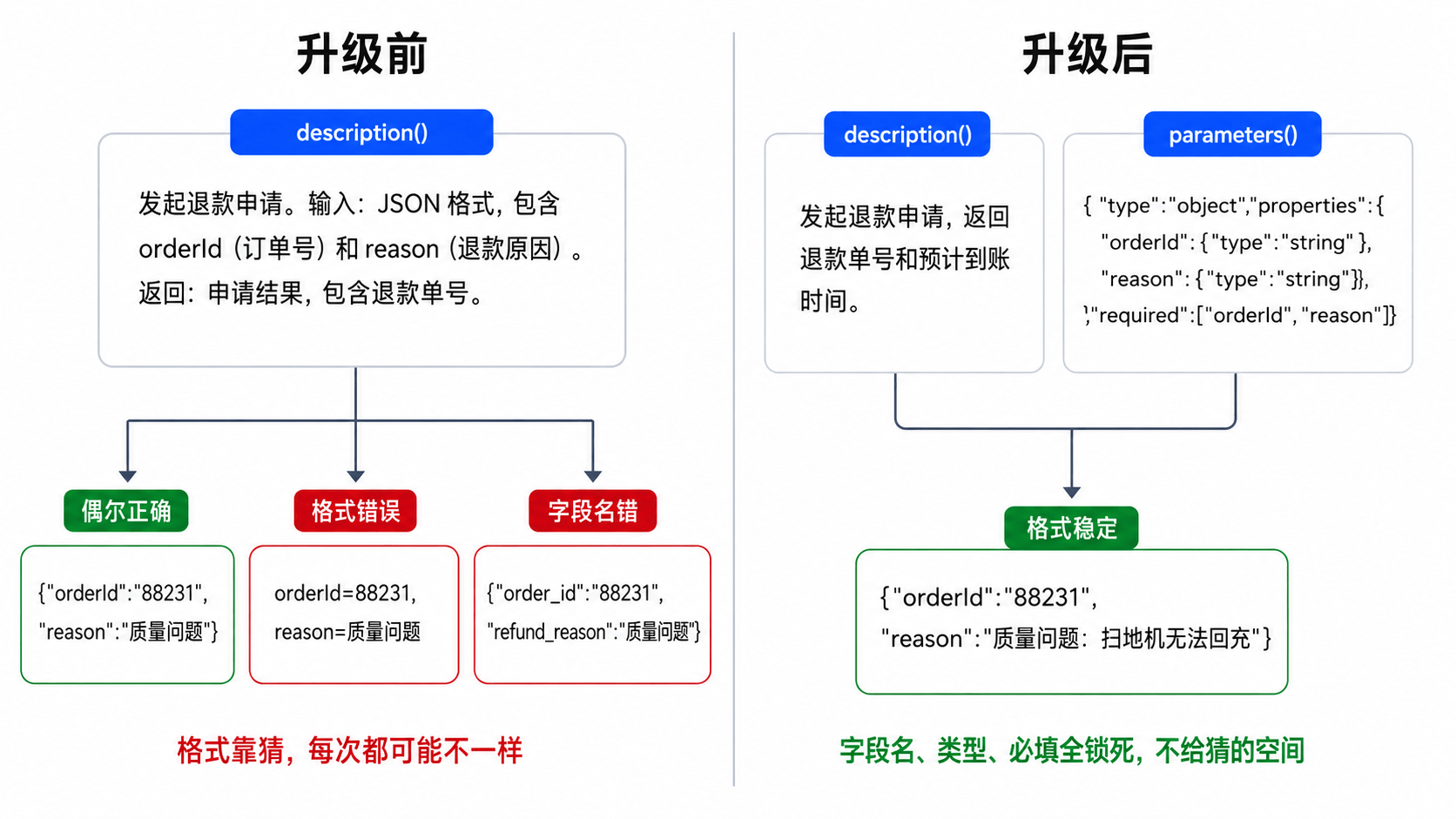
第一种用了键值对格式,第二种直接拼字符串,第三种用了错误的字段名。三种情况的共同点是——invoke() 里解析 JSON 直接报错,工具返回异常信息,大脑看到错误再试一次,运气好能纠正,运气不好连试三次格式都不对,用户在那干等。
为什么会这样?因为 description() 只是一段自然语言,大脑理解自然语言有歧义。“输入:JSON 格式,包含 orderId 和 reason”——这句话对人来说很清楚,但大模型可能理解成各种格式。它不知道字段名是驼峰还是下划线,不知道值应该是字符串还是数字,不知道是不是每个字段都必填。
2. 再看一个更隐蔽的问题
QueryOrderTool 的描述是:
查询订单详情。输入:订单号(如 88231)。返回:商品名、下单时间、签收时间、订单状态、运单号。
大脑大部分时候会正确传入 88231。但偶尔你会看到:
Action Input: 订单号:88231
Action Input: orderId: 88231
Action Input: {"orderId":"88231"}
第一种在前面加了中文前缀,第二种加了字段名,第三种直接传了 JSON。invoke() 里用 input.trim() 拿到的不是纯订单号,equals("88231") 匹配失败,返回“订单不存在”。大脑看到这个结果,可能会以为订单真的不存在,给用户一个错误的回复——比翻车更危险,因为你都不知道它错了。
3. 问题的根源
两个翻车现场指向同一个根源:工具的入参描述不够精确,大脑只能靠猜。
自然语言描述有三个先天缺陷:
| 缺陷 | 表现 | 后果 |
|---|---|---|
| 格式模糊 | “输入:JSON 格式”——什么样的 JSON? | 大脑可能传 JSON、键值对、纯文本,格式不可控 |
| 字段名不确定 | “包含 orderId”——是 orderId 还是 order_id? | 解析时找不到字段,工具执行失败 |
| 约束缺失 | 没说哪些必填、什么类型、取值范围 | 大脑可能漏传参数或传了不合法的值 |
解决方案其实你已经见过了。在 RAG 系列的 Function Call(函数调用)那一篇里,模型 API 原生的工具定义就是用 JSON Schema 来描述参数的——字段名、类型、是否必填、描述,全部用结构化的格式写死,不给模型发挥的空间。
这一篇,咱们就把这套思路搬到 ReAct Agent 里来。
下面这张图把问题和解法放在一起看——左边是升级前,大脑只能靠猜;右边是升级后,JSON Schema 把格式锁死:
JSON Schema:把参数说清楚的标准方式
1. 什么是 JSON Schema
JSON Schema 是一套用 JSON 格式来描述 JSON 数据结构的标准。简单说,它是 JSON 的说明书——告诉你一段 JSON 里应该有哪些字段、每个字段是什么类型、哪些必填。
举个例子,applyRefund 工具需要的入参是这样的 JSON:
{"orderId": "88231", "reason": "质量问题:扫地机无法回充"}
用 JSON Schema 来描述这段 JSON 的结构:
{
  "type": "object",
  "properties": {
    "orderId": {
      "type": "string",
      "description": "订单号,如 88231"
    },
    "reason": {
      "type": "string",
      "description": "退款原因,需说明具体问题"
    }
  },
  "required": ["orderId", "reason"]
}
这段 Schema 把三件事说得明明白白:
- 字段名:
orderId和reason,驼峰命名,不是order_id,不是refund_reason。 - 类型:都是
string,不是数字,不是布尔。 - 必填:
required里写了两个字段,一个都不能少。
大脑看到这段 Schema,就不需要猜了——格式是 JSON 对象,字段名是确定的,类型是确定的,必填也是确定的。输出结果的一致性会大幅提升。
2. 常用的 Schema 关键字
在工具定义里,你用到的 JSON Schema 关键字不多,掌握这几个就够了:
| 关键字 | 作用 | 示例 |
|---|---|---|
type | 值的类型 | string、number、integer、boolean、object、array |
properties | 对象里包含的字段 | {"orderId": {"type": "string"}} |
required | 必填字段列表 | ["orderId", "reason"] |
description | 字段的自然语言说明 | "订单号,如 88231" |
enum | 枚举值,限定取值范围 | ["refund", "exchange"] |
items | 数组里每个元素的类型 | {"type": "string"} |
这些关键字足以覆盖比特严选智能体的五个工具的所有参数定义。更复杂的 Schema 特性(oneOf、$ref、pattern 等)在工具定义场景里几乎用不到,不需要学。
重新设计 Tool 接口
1. 上一篇的接口
先回顾上一篇的 Tool 接口:
public interface Tool {

    String name();

    String description();

    String invoke(String input);
}
三个方法:我叫什么、我能干什么、执行。description() 返回一段自然语言文本,参数格式全靠这段话来传达。
2. 加上参数 Schema
现在要把参数定义从自然语言升级到 JSON Schema。最直接的做法是加一个方法,返回参数的 Schema:
public interface Tool {

    String name();

    String description();

    String parameters();

    String invoke(String input);
}
description() 还是返回一句话概述工具的用途,但不再承担描述参数格式的任务。参数的精确定义全部交给 parameters() 返回的 JSON Schema 字符串。
有些工具不需要参数(比如 getCurrentTime),parameters() 返回空 Schema 或空字符串就行。为了减少重复代码,给它一个默认实现:
public interface Tool {

    String name();

    String description();

    default String parameters() {
        return "";
    }

    String invoke(String input);
}
不需要参数的工具就不用覆写 parameters(),需要参数的工具覆写它返回自己的 Schema。
3. 五个工具的参数 Schema
现在把比特严选的五个工具逐个补上 Schema。
查询订单工具——只需要一个订单号:
public class QueryOrderTool implements Tool {

    @Override
    public String name() {
        return "queryOrder";
    }

    @Override
    public String description() {
        return "查询订单详情,返回商品名、价格、下单时间、签收时间、订单状态、运单号。";
    }

    @Override
    public String parameters() {
        return """
                {
                  "type": "object",
                  "properties": {
                    "orderId": {
                      "type": "string",
                      "description": "订单号,如 88231"
                    }
                  },
                  "required": ["orderId"]
                }""";
    }

    @Override
    public String invoke(String input) {
        String orderId = ToolUtils.extractField(input, "orderId");
        if ("88231".equals(orderId)) {
            return "{\"orderId\":\"88231\",\"product\":\"比特 S10 Pro 扫地机\","
                 + "\"price\":1999,\"orderTime\":\"2026-06-20\","
                 + "\"signTime\":\"2026-06-22\",\"status\":\"已签收\","
                 + "\"trackingNo\":\"SF1234567890\"}";
        }
        return "{\"error\":" + ToolUtils.toJsonString("订单不存在:" + orderId) + "}";
    }
}
注意 invoke() 的变化:上一篇直接拿 input.trim() 当订单号用,现在改成从 JSON 里提取 orderId 字段。既然告诉大脑要传 JSON,invoke() 里也得按 JSON 来解析——前后一致,不留歧义。
ToolUtils.extractField()是个工具方法,后面的从入参到解析小节会统一实现,这里先看效果。
退款申请工具——两个必填字段,这正是上面翻车的重灾区:
public class ApplyRefundTool implements Tool {

    @Override
    public String name() {
        return "applyRefund";
    }

    @Override
    public String description() {
        return "发起退款申请,返回退款单号和预计到账时间。";
    }

    @Override
    public String parameters() {
        return """
                {
                  "type": "object",
                  "properties": {
                    "orderId": {
                      "type": "string",
                      "description": "订单号"
                    },
                    "reason": {
                      "type": "string",
                      "description": "退款原因,需说明具体问题,如 质量问题:扫地机无法回充"
                    }
                  },
                  "required": ["orderId", "reason"]
                }""";
    }

    @Override
    public String invoke(String input) {
        String orderId = ToolUtils.extractRequiredField(input, "orderId");
        if (orderId.isBlank()) {
            return ToolUtils.missingRequiredField("orderId");
        }

        String reason = ToolUtils.extractRequiredField(input, "reason");
        if (reason.isBlank()) {
            return ToolUtils.missingRequiredField("reason");
        }

        return "{\"success\":true,\"refundId\":\"RF20260629001\","
             + "\"orderId\":" + ToolUtils.toJsonString(orderId) + ","
             + "\"reason\":" + ToolUtils.toJsonString(reason) + ","
             + "\"message\":\"退款申请已提交,预计 1-3 个工作日到账\"}";
    }
}
对比上一篇的 description(),参数信息从一段自然语言变成了结构化的 Schema:字段名锁死 orderId 和 reason,类型锁死 string,两个都是 required。invoke() 里也要跟着做必填校验,缺 orderId 或 reason 时直接返回明确错误,避免出现参数没拿到却仍然“退款成功”的假成功。大脑看到这个 Schema,输出 {"order_id":"88231"} 这种错误字段名的概率会骤降。
查物流工具——输入是运单号:
public class QueryLogisticsTool implements Tool {

    @Override
    public String name() {
        return "queryLogistics";
    }

    @Override
    public String description() {
        return "根据运单号查询物流轨迹,返回承运商、物流状态和轨迹详情。";
    }

    @Override
    public String parameters() {
        return """
                {
                  "type": "object",
                  "properties": {
                    "trackingNo": {
                      "type": "string",
                      "description": "快递运单号,如 SF1234567890"
                    }
                  },
                  "required": ["trackingNo"]
                }""";
    }

    @Override
    public String invoke(String input) {
        String trackingNo = ToolUtils.extractField(input, "trackingNo");
        if ("SF1234567890".equals(trackingNo)) {
            return "{\"trackingNo\":\"SF1234567890\",\"carrier\":\"顺丰速运\","
                 + "\"status\":\"已签收\",\"traces\":["
                 + "{\"time\":\"2026-06-20 18:20:00\",\"desc\":\"快件已揽收\"},"
                 + "{\"time\":\"2026-06-21 09:10:00\",\"desc\":\"快件到达上海转运中心\"},"
                 + "{\"time\":\"2026-06-22 11:35:00\",\"desc\":\"快件已由本人签收\"}"
                 + "]}";
        }
        return "{\"error\":" + ToolUtils.toJsonString("未找到物流轨迹:" + trackingNo) + "}";
    }
}
检索知识库工具——输入是用户的查询文本:
public class SearchKnowledgeTool implements Tool {

    @Override
    public String name() {
        return "searchKnowledge";
    }

    @Override
    public String description() {
        return "检索比特严选知识库,返回匹配的售后政策、常见问题或产品信息。";
    }

    @Override
    public String parameters() {
        return """
                {
                  "type": "object",
                  "properties": {
                    "query": {
                      "type": "string",
                      "description": "搜索关键词或问题,如 扫地机 退货政策"
                    }
                  },
                  "required": ["query"]
                }""";
    }

    @Override
    public String invoke(String input) {
        String query = ToolUtils.extractField(input, "query");
        return "{\"query\":" + ToolUtils.toJsonString(query) + ","
             + "\"matched\":\"七天无理由退货政策\","
             + "\"content\":\"签收次日起 7 天内,商品外观和主要配件完整,"
             + "可申请退货;质量问题需先进行售后检测。\"}";
    }
}
获取当前时间工具——不需要参数,用默认的空 parameters() 就行:
public class GetCurrentTimeTool implements Tool {

    @Override
    public String name() {
        return "getCurrentTime";
    }

    @Override
    public String description() {
        return "获取当前日期和时间,无需任何参数。";
    }

    @Override
    public String invoke(String input) {
        String now = LocalDateTime.now()
                .format(DateTimeFormatter.ofPattern("yyyy-MM-dd'T'HH:mm:ss"));
        return "{\"currentTime\":\"" + now + "\"}";
    }
}
五个工具全部改完。核心变化就一个:参数定义从 description() 里的自然语言,搬到了 parameters() 里的 JSON Schema。description() 只管说自己能干什么,parameters() 专管说要传什么参数,职责分离。
升级 ToolRegistry
1. 旧版 buildToolList() 的问题
上一篇的 buildToolList() 只拼了工具名和描述:
1. queryOrder - 查询订单详情。输入:订单号(如 88231)。返回:商品名、下单时间、签收时间、订单状态、运单号。
2. queryLogistics - 根据运单号查询物流轨迹……
大脑只看到一行文本,参数的精确格式全靠理解这句话。现在有了 parameters() 返回的 JSON Schema,buildToolList() 要把 Schema 也塞进去。
2. 新版 buildToolList()
public class ToolRegistry {

    private final Map<String, Tool> tools = new LinkedHashMap<>();

    public void register(Tool tool) {
        Objects.requireNonNull(tool, "tool must not be null");
        tools.put(tool.name(), tool);
    }

    public String execute(Action action) {
        if (action == null || action.toolName() == null || action.toolName().isBlank()) {
            return "{\"error\":\"未解析到可执行的工具名称\"}";
        }

        Tool tool = tools.get(action.toolName());
        if (tool == null) {
            return "{\"error\":\"未找到工具:" + action.toolName() + "\"}";
        }
        return tool.invoke(action.toolInput() == null ? "" : action.toolInput());
    }

    public String buildToolList() {
        StringBuilder sb = new StringBuilder();
        int index = 1;
        for (Tool tool : tools.values()) {
            sb.append(index++).append(". ")
              .append(tool.name())
              .append("\n   描述:")
              .append(tool.description())
              .append("\n");

            String params = tool.parameters();
            if (params != null && !params.isBlank()) {
                sb.append("   参数 Schema:")
                  .append(params.strip())
                  .append("\n");
            } else {
                sb.append("   参数:无\n");
            }
            sb.append("\n");
        }
        return sb.toString();
    }
}
变化只在 buildToolList() 里:每个工具除了名称和描述,还把参数 Schema 原样输出。大脑在系统提示词里看到的工具列表变成了这样:
1. queryOrder
   描述:查询订单详情,返回商品名、价格、下单时间、签收时间、订单状态、运单号。
   参数 Schema:{"type":"object","properties":{"orderId":{"type":"string","description":"订单号,如 88231"}},"required":["orderId"]}

2. applyRefund
   描述:发起退款申请,返回退款单号和预计到账时间。
   参数 Schema:{"type":"object","properties":{"orderId":{"type":"string","description":"订单号"},"reason":{"type":"string","description":"退款原因,需说明具体问题,如 质量问题:扫地机无法回充"}},"required":["orderId","reason"]}

3. getCurrentTime
   描述:获取当前日期和时间,无需任何参数。
   参数:无
对比一下升级前后大脑看到的信息:
| 维度 | 升级前 | 升级后 |
|---|---|---|
| 工具用途 | 和参数混在一起描述 | 单独的 description,只说用途 |
| 参数名 | 藏在自然语言里 | JSON Schema 的 properties 里明确列出 |
| 参数类型 | 没有 | type 字段标注 |
| 是否必填 | 没有 | required 数组标注 |
| 参数示例 | 有时有,有时没有 | description 字段里统一给出 |
信息量没有增加多少,但精确度提升了一个数量级。
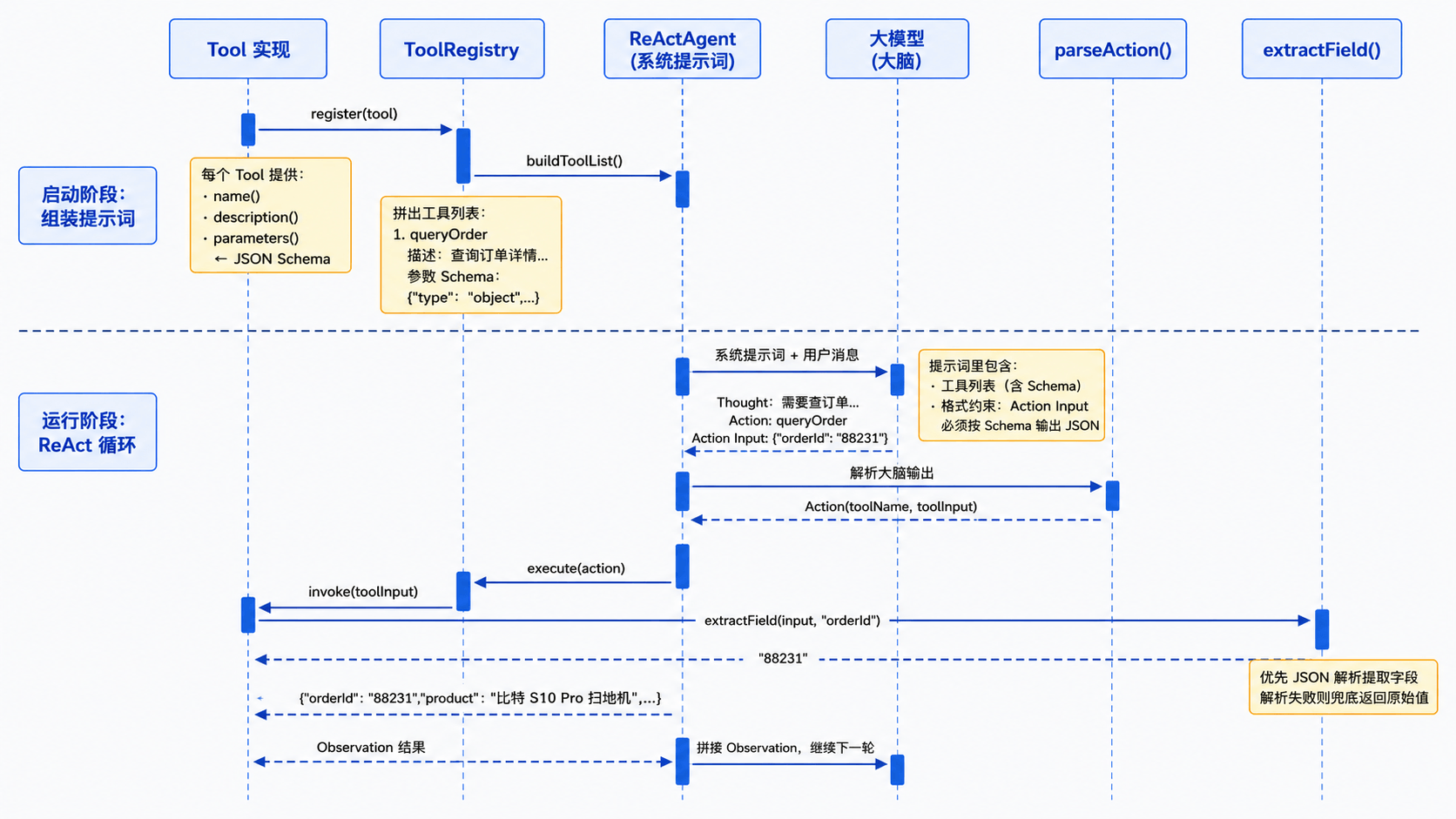
到这里,工具定义、注册、提示词组装、大脑输出、解析执行的完整链路已经讲完了。下面这张数据流图把整条链路串起来,帮你建立全局视角:
从入参到解析:extractField 工具方法
参数定义升级了,invoke() 里的解析也得跟着升级。上一篇的 invoke() 直接拿 input.trim() 当参数用,现在入参是 JSON,需要从里面提取字段。
1. 实现 extractField
写一个通用的字段提取方法,放在工具的基类或工具方法类里:
public class ToolUtils {

    private static final ObjectMapper MAPPER = new ObjectMapper();

    public static String extractField(String input, String fieldName) {
        return extractField(input, fieldName, true);
    }

    public static String extractRequiredField(String input, String fieldName) {
        return extractField(input, fieldName, false);
    }

    public static String missingRequiredField(String fieldName) {
        return "{\"error\":" + toJsonString("缺少必填参数 " + fieldName) + "}";
    }

    public static String toJsonString(String value) {
        try {
            return MAPPER.writeValueAsString(value == null ? "" : value);
        } catch (JsonProcessingException e) {
            return "\"\"";
        }
    }

    private static String extractField(String input, String fieldName, boolean fallbackToRawInput) {
        if (input == null || input.isBlank() || fieldName == null || fieldName.isBlank()) {
            return "";
        }
        String trimmed = input.trim();

        // 优先按 JSON 解析
        if (trimmed.startsWith("{")) {
            try {
                JsonNode node = MAPPER.readTree(trimmed);
                JsonNode field = node.get(fieldName);
                if (field != null && !field.isNull()) {
                    return field.asText().trim();
                }
                // JSON 合法但目标字段不存在,返回空串让调用方知道没拿到值
                return "";
            } catch (Exception ignored) {
                // JSON 解析失败,按调用方要求决定是否兜底
                return fallbackToRawInput ? trimmed : "";
            }
        }

        // 兜底:如果不是 JSON,单参数工具可以直接返回原始输入
        return fallbackToRawInput ? trimmed : "";
    }
}
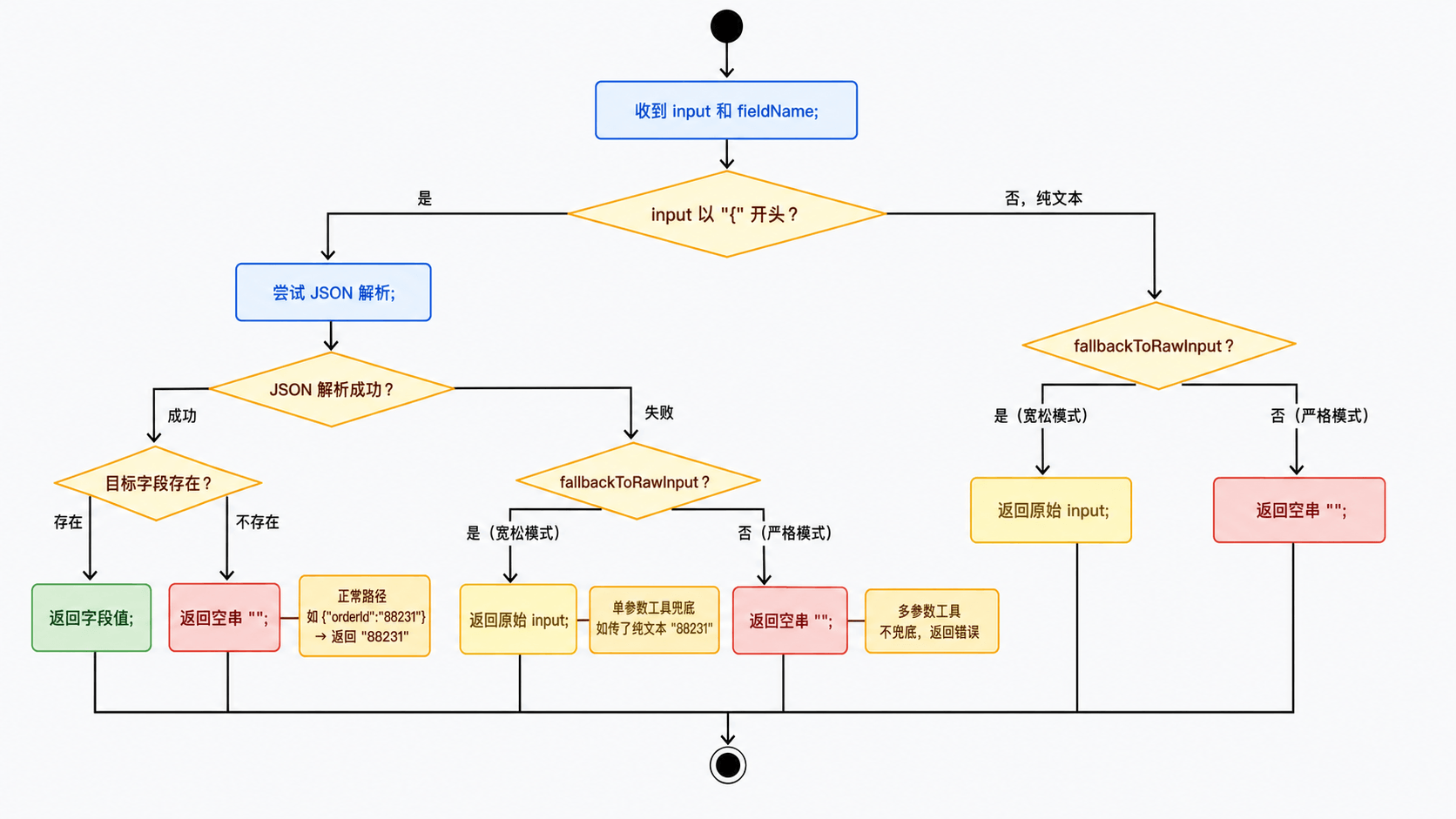
这个方法分三种情况处理:
- 正常路径:大脑传了正确的 JSON(
{"orderId":"88231"}),从里面提取指定字段,返回订单号88231。 - 字段缺失:大脑传了 JSON 但字段名不对(
{"order_id":"88231"}),node.get("orderId")拿到 null,返回空串——调用方拿到空值会返回“订单不存在”,比把整段 JSON 当订单号传下去更容易排查。 - 纯文本兜底:大脑传了纯文本(
88231),宽松提取会直接把原始输入当结果返回。
为什么要兜底?因为即使加了 JSON Schema,也不能保证大脑每次都传 JSON。特别是只有一个参数的工具(比如 queryOrder 只需要订单号),有些模型习惯直接传值而不包 JSON。兜底逻辑让这种情况也能正常工作,而不是直接报错。
但兜底只适合单参数工具。像 applyRefund 这种多参数工具,不能把 orderId=88231, reason=质量问题 这种整段文本当成某一个字段值,否则很容易制造假成功。所以多参数工具应该使用 extractRequiredField():JSON 合法且字段存在才返回字段值,字段缺失或 JSON 解析失败都返回空串,再由工具返回明确的缺参错误。
上面这段逻辑用文字描述容易绕,看一下解析流程图会清楚很多:
2. 在工具里使用
public class QueryOrderTool implements Tool {

    // name()、description()、parameters() 省略...

    @Override
    public String invoke(String input) {
        String orderId = ToolUtils.extractField(input, "orderId");
        if ("88231".equals(orderId)) {
            return "{\"orderId\":\"88231\",\"product\":\"比特 S10 Pro 扫地机\","
                 + "\"price\":1999,\"orderTime\":\"2026-06-20\","
                 + "\"signTime\":\"2026-06-22\",\"status\":\"已签收\","
                 + "\"trackingNo\":\"SF1234567890\"}";
        }
        return "{\"error\":" + ToolUtils.toJsonString("订单不存在:" + orderId) + "}";
    }
}
一行 ToolUtils.extractField(input, "orderId") 搞定。JSON 能解析就提取字段,解析不了就拿原始值兜底。
提示词里怎么告诉大脑用 JSON 传参
工具的 Schema 定义好了,buildToolList() 也能输出 Schema 了,但还差一步:提示词里要明确告诉大脑用 JSON 格式传参。
上一篇的系统提示词里格式约束是这样的:
Action Input: <传给工具的参数>
太模糊了,大脑不知道参数该长什么样。现在改成:
Action Input: <传给工具的参数,必须严格按照工具的参数 Schema 输出 JSON 格式。如果工具无需参数,输出 {}>
完整的系统提示词更新后是这样:
private String buildSystemPrompt() {
    return """
            你是比特严选的智能客服助手。你可以使用以下工具来帮助用户解决问题。

            工具列表:
            %s
            请严格按照以下格式思考和行动:

            Thought: <你的思考过程,分析当前局面,决定下一步做什么>
            Action: <要调用的工具名,必须是工具列表中的一个>
            Action Input: <传给工具的参数,必须严格按照工具的参数 Schema 输出 JSON 格式。如果工具无需参数,输出 {}>

            工具执行后你会收到 Observation(工具返回的结果),然后继续下一轮思考。
            重复上述过程,直到你收集到足够的信息来回答用户。

            当你准备好给出最终答案时,使用以下格式:

            Thought: <总结已有信息,说明为什么可以回答了>
            Final Answer: <给用户的最终回复>

            注意:
            - 每次只调用一个工具
            - 必须先 Thought 再 Action,不要跳过思考步骤
            - Action 必须是工具列表中存在的工具名,不要编造工具
            - Action Input 必须是合法 JSON,字段名和类型严格匹配工具的参数 Schema
            """.formatted(toolRegistry.buildToolList());
}
变化只有两处:Action Input 的格式说明更明确了,注意事项里加了一条 JSON 格式约束。提示词的其他部分不变——打磨的活留给第 07 篇。
还有一个容易漏掉的工程细节:如果大脑把 JSON 分多行输出,上一篇的 parseAction() 只读取 Action Input: 所在行,会把下面这种输入解析成一个孤零零的 {:
Action Input: {
  "orderId": "88231"
}
所以解析动作时也要支持多行 Action Input。可以从 Action Input: 后开始收集内容,直到遇到下一个 ReAct 标签:
private Action parseAction(String llmOutput) {
    String toolName = "";
    String toolInput = "";

    String[] lines = llmOutput.split("\\R", -1);
    for (int i = 0; i < lines.length; i++) {
        String trimmed = lines[i].trim();
        if (trimmed.startsWith("Action Input:")) {
            StringBuilder inputBuilder = new StringBuilder(
                    trimmed.substring("Action Input:".length()).trim());
            while (i + 1 < lines.length && !isPromptSection(lines[i + 1].trim())) {
                i++;
                if (!inputBuilder.isEmpty()) {
                    inputBuilder.append("\n");
                }
                inputBuilder.append(lines[i].trim());
            }
            toolInput = inputBuilder.toString().trim();
        } else if (trimmed.startsWith("Action:")) {
            toolName = trimmed.substring("Action:".length()).trim();
        }
    }
    return new Action(toolName, toolInput);
}

private boolean isPromptSection(String line) {
    return line.startsWith("Thought:")
            || line.startsWith("Action:")
            || line.startsWith("Action Input:")
            || line.startsWith("Observation:")
            || line.startsWith("Final Answer:");
}
升级前后对比:跑一个退款场景
说了这么多,到底有没有效果?咱们把升级后的代码跑一遍退款场景,对比一下大脑的输出。
1. 升级前大脑看到的工具列表
1. queryOrder - 查询订单详情。输入:订单号(如 88231)。返回:商品名、下单时间、签收时间、订单状态、运单号。
2. queryLogistics - 根据运单号查询物流轨迹。输入:运单号。返回:物流状态、轨迹详情。
3. applyRefund - 发起退款申请。输入:JSON 格式,包含 orderId(订单号)和 reason(退款原因)。返回:申请结果,包含退款单号。
4. searchKnowledge - 检索知识库。输入:搜索关键词。返回:匹配的政策或 FAQ 内容。
5. getCurrentTime - 获取当前日期时间。无需输入参数,返回当前时间的 JSON。
2. 升级后大脑看到的工具列表
1. queryOrder
   描述:查询订单详情,返回商品名、价格、下单时间、签收时间、订单状态、运单号。
   参数 Schema:{"type":"object","properties":{"orderId":{"type":"string","description":"订单号,如 88231"}},"required":["orderId"]}

2. queryLogistics
   描述:根据运单号查询物流轨迹,返回承运商、物流状态和轨迹详情。
   参数 Schema:{"type":"object","properties":{"trackingNo":{"type":"string","description":"快递运单号,如 SF1234567890"}},"required":["trackingNo"]}

3. applyRefund
   描述:发起退款申请,返回退款单号和预计到账时间。
   参数 Schema:{"type":"object","properties":{"orderId":{"type":"string","description":"订单号"},"reason":{"type":"string","description":"退款原因,需说明具体问题,如 质量问题:扫地机无法回充"}},"required":["orderId","reason"]}

4. searchKnowledge
   描述:检索比特严选知识库,返回匹配的售后政策、常见问题或产品信息。
   参数 Schema:{"type":"object","properties":{"query":{"type":"string","description":"搜索关键词或问题,如 扫地机 退货政策"}},"required":["query"]}

5. getCurrentTime
   描述:获取当前日期和时间,无需任何参数。
   参数:无
3. 大脑输出对比
退款场景第 1 圈,大脑要调 queryOrder:
| 升级前(文本描述) | 升级后(JSON Schema) |
|---|---|
Action Input: 88231 | Action Input: {"orderId":"88231"} |
退款场景第 4 圈,大脑要调 applyRefund:
| 升级前(文本描述) | 升级后(JSON Schema) |
|---|---|
Action Input: {"orderId":"88231","reason":"质量问题"} | Action Input: {"orderId":"88231","reason":"质量问题:扫地机无法回充,维修无效"} |
偶尔出现 orderId=88231, reason=质量问题 | 格式一致性明显提升,JSON 格式稳定 |
升级前的 queryOrder 大脑直接传纯文本 88231,因为描述里说“输入:订单号”。升级后,Schema 明确定义了 orderId 字段,大脑会老老实实包一层 JSON。而 applyRefund 这种多参数工具的提升最明显——字段名、格式不再摇摆。
和 Function Call 原生方案的关系
读到这里你可能会问:RAG 系列的 Function Call 那一篇,模型 API 原生就支持 tools 参数,直接传 JSON Schema 过去,模型输出的 tool_calls 自带结构化的函数名和参数,根本不需要在提示词里约定 Action: / Action Input: 格式再自己解析——为什么 ReAct Agent 不直接用原生 Function Call?
好问题。答案是:可以用,而且后面会升级到那个方案,但不是这一篇的重点。
两种方案的对比:
| 维度 | 文本 ReAct(当前方案) | 原生 Function Call |
|---|---|---|
| 工具定义方式 | JSON Schema 写在提示词里 | JSON Schema 通过 API 的 tools 参数传入 |
| 模型输出格式 | 文本:Thought / Action / Action Input | 结构化:tool_calls JSON |
| 参数解析 | 自己从文本里提取 | API 直接返回解析好的 JSON |
| Thought 过程 | 文本里可见,格式统一,方便追踪 | 在 content 里可见,但不如 Thought: 标签直观,追踪需额外处理 |
| 兼容性 | 只要模型能聊天就能用 | 需要模型 API 支持 Function Call |
| 稳定性 | 依赖提示词约束,偶尔格式跑偏 | API 层面保证格式,更稳定 |
文本 ReAct 的核心优势是推理过程透明——Thought 直接写在输出里,格式统一,你能一字一句看到大脑在想什么。原生 Function Call 的输出虽然在 content 里也有推理文本,但格式不固定、没有 Thought: 这种标签,追踪和调试的体验不如文本 ReAct 直观。对于学习和调试 Agent 来说,能清晰看到每一步 Thought 比什么都重要。
另一个考虑是兼容性。文本 ReAct 只要求模型能做文本生成,几乎所有大模型都支持。原生 Function Call 需要模型 API 端做专门支持,不同厂商的实现细节还有差异。在学习阶段用文本 ReAct 理解原理,后续稳定环境再切到原生 Function Call 追求稳定性——这是一条务实的路径。
不管用哪种方案,工具的定义方式是一样的——都是 JSON Schema。这一篇升级的
Tool接口和parameters()方法,切换到原生 Function Call 时直接复用,改的只是调用方式和解析方式。
工具定义的几个实战经验
跑了足够多的场景之后,你会积累出一些工具定义的经验。这里提前总结几条,帮你少踩坑。
1. description 要写用途,不要写参数
// 反面示例:把参数信息塞进 description
"查询订单详情。输入:订单号(如 88231)。返回:商品名、下单时间、签收时间、订单状态、运单号。"

// 正面示例:description 只说用途,参数交给 Schema
"查询订单详情,返回商品名、价格、下单时间、签收时间、订单状态、运单号。"
参数已经有 Schema 了,description 里再写一遍反而是噪音——大脑可能会被两处描述的不一致搞晕。
2. description 里写返回值的概要
大脑决定调哪个工具时,最重要的判断依据是这个工具能给我什么信息。所以 description 里要告诉大脑返回值包含哪些内容:
// 反面示例:只说能做什么,没说返回什么
"查询订单详情。"

// 正面示例:说清楚返回什么
"查询订单详情,返回商品名、价格、下单时间、签收时间、订单状态、运单号。"
大脑在第二圈查物流时需要运单号,它得知道 queryOrder 能返回运单号,才会先去调 queryOrder。如果 description 没提到运单号,大脑可能会直接拿订单号去调 queryLogistics——参数不对,白跑一圈。
3. 参数的 description 要给示例
JSON Schema 的字段 description 不只是给人看的,大脑也会参考它来决定传什么值:
{
  "orderId": {
    "type": "string",
    "description": "订单号"
  }
}
这段 Schema 告诉大脑字段名是 orderId、类型是字符串,但没说值长什么样。大脑可能会传“订单88231”、“#88231”或“88231”——哪种都符合 string 类型。
加个示例就好了:
{
  "orderId": {
    "type": "string",
    "description": "订单号,如 88231"
  }
}
一个“如 88231”就能锚定格式——纯数字,不带前缀,不带井号。
4. 用 enum 约束有限取值
如果参数的取值是有限的几个选项,用 enum 比 description 里列举更靠谱。
假设未来比特严选要加一个查售后工单的工具,工单类型只有退货、换货、维修三种:
{
  "type": "object",
  "properties": {
    "orderId": {
      "type": "string",
      "description": "订单号"
    },
    "serviceType": {
      "type": "string",
      "description": "售后类型:refund=退款,exchange=换货,repair=维修",
      "enum": ["refund", "exchange", "repair"]
    }
  },
  "required": ["orderId", "serviceType"]
}
enum 把取值范围限死在三个选项里,大脑不会传“退款”、“退货退款”这些五花八门的值。
5. 一个工具做一件事
// 反面示例:一个工具又查又退
"查询或操作订单。输入 action=query 时查询订单,action=refund 时发起退款。"

// 正面示例:拆成两个工具
"queryOrder - 查询订单详情。"
"applyRefund - 发起退款申请。"
一个工具做多件事,Schema 要写 oneOf 来区分不同模式的参数,大脑理解难度直线上升,传参出错的概率也跟着上去。拆成两个工具,每个 Schema 简单明了。
升级前后完整对比
最后用一张表做个全面对比,看看这次升级改了什么、为什么改、效果怎么样:
| 维度 | 升级前(第 05 篇) | 升级后(本篇) |
|---|---|---|
| Tool 接口 | name() + description() + invoke() | 新增 parameters() 返回 JSON Schema |
| 参数描述 | 自然语言写在 description() 里 | JSON Schema 单独定义,结构化、无歧义 |
| buildToolList() | 拼名称 + 描述文本 | 拼名称 + 描述 + 参数 Schema |
| 提示词 | Action Input: <参数> | Action Input: <JSON 格式,按 Schema> |
| invoke() 解析 | input.trim() 直接用 | 单参数用 extractField() 宽松提取,多参数用 extractRequiredField() 严格提取 |
| 大脑传参格式 | 文本、键值对、JSON 混杂 | 主要是 JSON,一致性大幅提升 |
| 错误率 | 多参数工具偶发格式错误 | 格式错误明显减少 |
文末总结
这一篇把工具的参数定义从自然语言升级到了 JSON Schema:
- 翻车根源:自然语言描述参数有三个先天缺陷——格式模糊、字段名不确定、约束缺失,大脑只能靠猜。
- JSON Schema:用结构化的格式精确定义字段名、类型、是否必填,不给大脑猜的空间。
- 五处代码变动:
Tool接口新增parameters()方法;五个工具各自实现 Schema;ToolRegistry.buildToolList()输出 Schema;提示词里约束Action Input为 JSON 格式;parseAction()支持多行 JSON 入参。 - extractField 兜底:优先按 JSON 提取字段,单参数工具可以解析失败后返回原始输入;多参数工具用
extractRequiredField()严格提取,缺字段就返回明确错误。 - 实战经验:description 只写用途和返回值概要,不写参数;参数 description 给示例值;有限取值用 enum;一个工具只做一件事。
一句话收尾:JSON Schema 不是万能的,但它把大脑传参的确定性从“大部分时候对”提升到了“绝大部分时候对”——在工程上,这个差距就是能不能稳定回复的关键因素。
下一篇咱们进入提示词设计——系统提示词是 Agent 的灵魂,怎么写 Few-shot 示例引导大脑稳定输出、怎么用负面约束防止跑偏、怎么处理边界情况,都是第 07 篇的内容。我们下一篇见。